
背景
客户测试背景
- 一些客户想去评估其所拥有的边界安全设备针对某个恶意IP在持续发起攻击过程中的封禁时间,这里指的封禁是边界安全设备会封禁某个IP,使得其在一段时间内无法访问其(边界安全设备)所受保护的网站,表现出来的现象是,当一个IP被封禁之后,使用该IP发起web请求时,TCP连接会被中断或数据包被丢弃。
- 因此我们BAS需要一个内置场景,关于测试IP封禁时间的。
什么是IP封禁/IP黑名单
边界安全设备的这种封禁功能通常被称为“IP封禁”或“IP黑名单”,其原理可以分为以下几个步骤:
-
检测恶意请求:边界安全设备(例如防火墙、入侵检测系统、入侵防御系统等)会实时监控通过的网络流量,利用预定义的规则、签名库或者行为分析技术,识别出恶意请求。这些恶意请求可能包括SQL注入、XSS攻击、端口扫描等。
-
记录恶意IP:一旦检测到恶意请求,设备会将发起这些请求的IP地址记录下来。根据设备的配置,这些IP地址可能会被立即加入到一个临时或永久的黑名单中。
-
封禁恶意IP:当IP地址被加入黑名单后,设备会对来自这些IP地址的后续请求进行封禁。封禁可以通过以下几种方式实现:
a. 丢弃数据包:设备可以直接丢弃来自黑名单IP的所有数据包,不进行任何处理。
b. 主动中断连接:设备可以发送TCP重置(RST)包,主动中断与黑名单IP的任何现有连接。
c. 拒绝连接:设备可以配置为拒绝黑名单IP的任何新连接请求(例如,TCP的SYN包)。
-
恢复正常请求:如果封禁策略是临时的,设备可能会在一段时间后自动解除封禁,允许该IP地址重新发起请求。如果封禁是永久的,则需要手动从黑名单中移除该IP地址。
-
日志和报警:在执行上述操作时,设备通常会生成相应的日志记录,并可能触发报警,以便安全管理员能够审查和采取进一步的行动。
这种机制的主要目的是阻止攻击者反复利用相同的IP地址对网络进行攻击,同时也可以减轻服务器和网络设备的负载。需要注意的是,这种方法对于使用动态IP地址或代理服务器的攻击者可能不太有效,因此通常需要结合其他防护措施,例如基于行为的检测、频率限制和威胁情报共享。
功能设计
一些疑问
- 该功能会持续两天这种测试吗?如果是的话也就意味着一个IP封禁任务可能会持续 2 - 3天这种,会变成一个后台定时任务,每个小时触发一次;我记得我们有一个任务卡住的话,后面任务没法继续进行;
- 前端结果展示呢?
- 我们测试的代理从哪来?持续的从印老板那边获取?然后定期更新到某个文件里去?人工更新不行吧,所以需要印老板那边有一个持续的代理池,和加特林共用一个加特林代理池;
初始代码Demo
-
代码逻辑:
-
用户定义目标网站列表、测试周期、测试频率
-
举例如下:
- 测试网站:https://www.ccdc.com.cn https://yield.chinabond.com
- 测试周期:2、0.5、1等,以天为单位;
- 测试频率:15、60、10等,以分钟为单位;
-
-
从代理文件,如 proxies.txt 中读取最新的代理池 IP;
-
尝试通过该代理发起一次正常的 GET 请求访问目标网站
- 能通过代理正常请求访问目标网站,说明该代理可用(正常请求没有被目标网站安全设备所封禁)
- 如果所有代理都不能访问目标网站,则返回代理池的代理都不可用/被封,需要加新的代理。
-
并发10,发起恶意 POST 请求,请求体携带恶意内容:
- id=exec--%0Amaster..xp_cmdshell--%0A'whoami'
-
并发完成后,尝试发起一次正常的 GET 请求访问目标网站,如果此时正常请求已不能获取响应或者正常请求的响应内容和第一次正常请求的响应内容不一样,则判断目标已将我们的IP封禁,此时计算封禁时间 = 当前时间 - 最开始发起恶意请求的时间;
- 如果正常请求依然能获取正常响应,则继续下一次并发循环;
- 并发循环超过 200 次,则返回判断目标不会进行拦截封禁;
-
-
代码Demo:
import argparse
import requests
import concurrent.futures
import urllib3
import hashlib
import base64
import hmac
import time
import json
from datetimeimport datetime, timedelta
import schedule

urllib3.disable_warnings(urllib3.exceptions.InsecureRequestWarning)

SECRET = "[REDACTED]"
PROXY_FILE_PATH = 'F:\\proxy.txt'
BAD_DATA = "id=exec--%0Amaster..xp_cmdshell--%0A'whoami'"

def send_robot(msg):
    timestamp = int(time.time())
    string_to_sign = f'{timestamp}@{SECRET}'
    hmac_code = hmac.new(string_to_sign.encode('utf-8'),digestmod=hashlib.sha256).digest()
    sign = base64.b64encode(hmac_code).decode('utf-8')
    url = 'https://apigw.lx.qianxin.com/v1/bot/hook/messages/create?hook_token=[REDACTED]'
    headers = {'Content-Type': 'application/json'}
    data = {
        "sign": sign,
        "timestamp": str(timestamp),
        "msgType": "text",
        "msgData": {
            "text": {
                "content":msg
            }
        }
    }
    requests.post(url,headers=headers,data=json.dumps(data))

def send_request_through_socks_proxy(ip,port,url,data):
    proxy = f'socks5://{ip}:{port}'
    proxies = {'http': proxy, 'https': proxy}
    headers = {
        'User-Agent': 'Mozilla/5.0 (Windows NT 10.0; Win64; x64) AppleWebKit/537.36 (KHTML, like Gecko) Chrome/91.0.4472.124 Safari/537.36',
        'Accept': 'text/html,application/xhtml+xml,application/xml;q=0.9,image/avif,image/webp,image/apng,*/*;q=0.8,application/signed-exchange;v=b3;q=0.9',
        'Accept-Language': 'en-US,en;q=0.9',
        'Connection': 'keep-alive',
        'Upgrade-Insecure-Requests': '1',
        'Cache-Control': 'max-age=0',
    }
try:
ifdata:
            response = requests.post(url,headers=headers,data=data,proxies=proxies,timeout=7,verify=False)
else:
            response = requests.get(url,headers=headers,proxies=proxies,timeout=7,verify=False)
return response.text
except requests.exceptions.RequestExceptionas e:
        print(f"Error: {e}")
return None

def check(ip,port,url):
    print(f"Sending attack request to {url} through proxy {ip}:{port}")
    send_request_through_socks_proxy(ip,port,url, BAD_DATA)

def check_ip_port(ip,port,url):
    print(f"Checking connection to {url} through proxy {ip}:{port}")
    repr = send_request_through_socks_proxy(ip,port,url, "")
if repr is None:
        print(f"Proxy {ip}:{port} cannot connect to {url}")
return "请求异常"
    print(f"Proxy {ip}:{port} connected to {url} successfully")
    start_time = datetime.now()
    sl = 0
    print("Starting IP blocking check threads")
while True:
with concurrent.futures.ThreadPoolExecutor(max_workers=10)as executor:
            futures = [executor.submit(check,ip,port,url)for _in range(10)]
        concurrent.futures.wait(futures)
        repr2 = send_request_through_socks_proxy(ip,port,url, "")
if repr2 is None or repr != repr2:
            end_time = datetime.now()
            duration = end_time - start_time
            print(f"IP blocking detected for proxy {ip}:{port} on {url}")
return f"拦截封禁触发时间: {duration}"
        sl += 1
if sl > 200:
break
    print(f"No IP blocking detected for proxy {ip}:{port} on {url}")
return "未发现拦截封禁"

def test_proxies_for_url(url):
    print(f"Starting proxy tests for {url}")
with open(PROXY_FILE_PATH, 'r')as file:
for linein file:
            ip, port = line.strip().split(':')
            print(f"Testing proxy {ip}:{port} for {url}")
            result = check_ip_port(ip, port,url)
if "异常" not in result:
                now = datetime.now()
                current_time = now.strftime("%Y-%m-%d %H:%M:%S")
                returnip = send_request_through_socks_proxy(ip, port, "https://myip.ipip.net", "") or \
                           send_request_through_socks_proxy(ip, port, "https://ipv4.ddnspod.com/", "") or \
                           send_request_through_socks_proxy(ip, port, "https://speed.neu.edu.cn/getIP.php", "") or \
                           "ip查询失败"
                message = f"{current_time}\n出口: {returnip}\n代理ip: {ip}\n目标网站: {url}\n结果: {result}"
                print(message)
                send_robot(message)
return
    send_robot(f"{url} 代理池的代理都被封了,加一点")
    print(f"All proxies are blocked for {url}, need to add more proxies")

def schedule_tests(test_urls,test_duration,test_frequency):
    print("Scheduling proxy tests")
for urlintest_urls:
        test_proxies_for_url(url)
    schedule.every(test_frequency).minutes.do(lambda: [test_proxies_for_url(url)for urlintest_urls])
    end_time = datetime.now() + timedelta(days=test_duration)
while datetime.now() < end_time:
        schedule.run_pending()
        time.sleep(1)
    print("Proxy testing schedule completed")

if __name__ == "__main__":
    parser = argparse.ArgumentParser(description='IP Blocking Test')
    parser.add_argument('--urls',nargs='+',required=True,help='List of target URLs to test')
    parser.add_argument('--duration',type=int,required=True,help='Testing duration in days')
    parser.add_argument('--frequency',type=int,required=True,help='Testing frequency in minutes')

    args = parser.parse_args()
    schedule_tests(args.urls, args.duration, args.frequency)
- 使用示例:
# 示例1:测试两个目标网站,测试周期为2天,每30分钟测试一次
python script_name.py --urls https://www.ccdc.com.cn https://yield.chinabond.com.cn --duration 2 --frequency 30

# 示例2:测试三个目标网站,测试周期为1天,每15分钟测试一次
python script_name.py --urls https://example.com https://another-example.com https://yet-another-example.com --duration 1 --frequency 15

# 示例3:测试一个目标网站,测试周期为3天,每60分钟测试一次
python script_name.py --urls https://single-target.com --duration 3 --frequency 60

# 示例4:测试五个目标网站,测试周期为0.5天(12小时),每10分钟测试一次
python script_name.py --urls https://site1.com https://site2.com https://site3.com https://site4.com https://site5.com --duration 0.5 --frequency 10
- 上述代码因为临时项目测试,所以有一个send_robot,连接蓝信机器人,将消息推送到蓝信机器人,如下:
[REDACTED]
获取代理
业务需求
-
目前打算采用"快代理付费"的方式进行代理获取,其中有几种付费方案;
-
业务需求是:
- 每次创建任务的时候获取对应需要的代理IP;
- 创建任务的时候需要选择是否使用代理IP;
怎么买代理
- 目前看来"私密代理"的方案比较符合当前的业务需求。
- 需要先"下单"私密代理,购买一定数量的IP,指定每个提取的IP的有效时长,以及当前这个订单的有效时长?
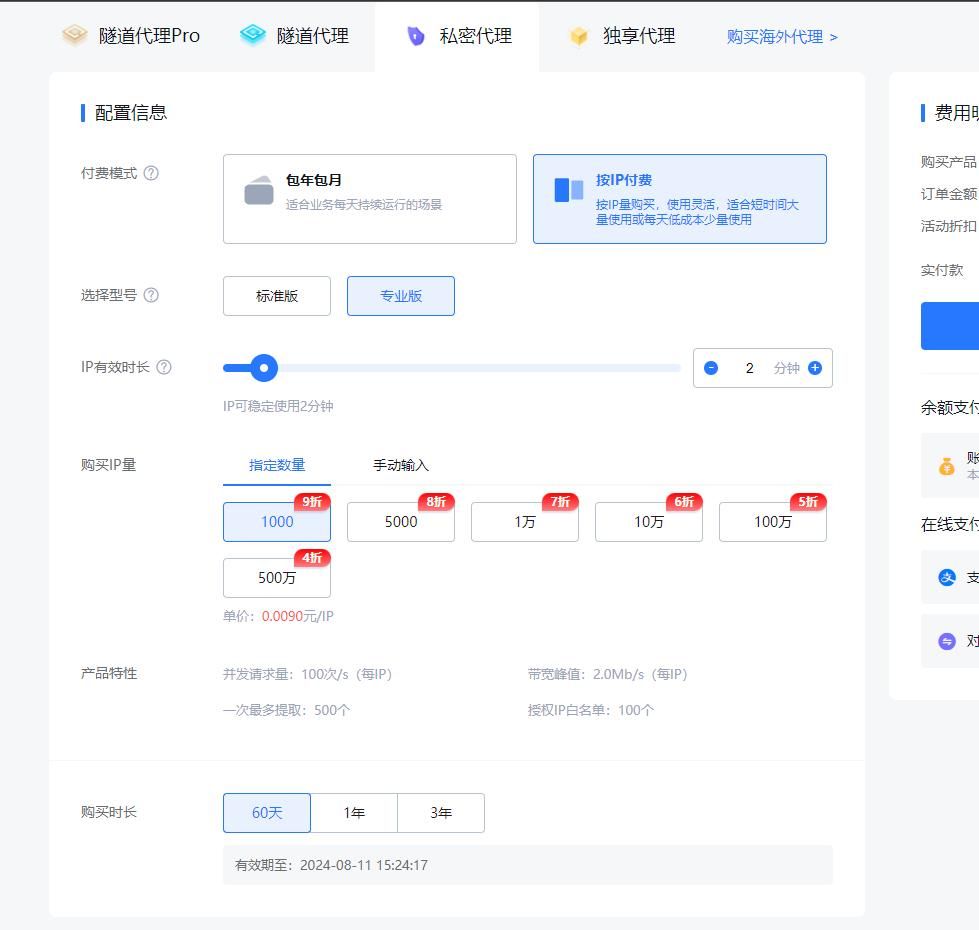
- 购买之后,会生成一个订单,此时我们可以在"私密代理"页面查看:
[REDACTED]
- 然后我们可以通过"API"设置页面提供的订单密钥访问"令牌接口"获取对应的Token,该Token用于获取代理IP,时效性默认60分钟,可以手动调整;获取到代理IP之后,使用该代理IP的时候需要用到上述订单提供的用户名和密码;
- 另外我们需要在"API"设置中默认关闭"密钥明文验证"(为了安全性起见),采取上述这种先获取时效性令牌,然后拿着时效性令牌去获取代理IP的方式;
- 设置白名单的IP不需要用户名+密码进行鉴权,但是考虑到后续BAS服务器IP很多,所以设置白名单的方式不考虑,而是考虑使用用户名+密码方式进行鉴权;
获取代理
-
Step 1:获取时效性Token(默认60分钟)
- 需要在API接口页面,选择对应订单查看对应的SecretId和SecretKey,填写到下面这个脚本中;
# 访问接口python3代码示例:
#!/usr/bin/env Python# -*- coding: utf-8 -*-import os
import sys
import json
import time
import requests

secret_id = ''
secret_key = ''
SECRET_PATH = './.secret'

def _get_secret_token():
    r = requests.post(url='https://auth.kdlapi.com/api/get_secret_token',data={'secret_id': secret_id, 'secret_key': secret_key})
if r.status_code != 200:
raise KdlException(r.status_code, r.content.decode('utf8'))
    res = json.loads(r.content.decode('utf8'))
    code, msg = res['code'], res['msg']
if code != 0:
raise KdlException(code, msg)
    secret_token = res['data']['secret_token']
    expire = str(res['data']['expire'])
    _time = '%.6f' % time.time()
return secret_token, expire, _time

def _read_secret_token():
with open(SECRET_PATH, 'r')as f:
        token_info = f.read()
    secret_token, expire, _time, last_secret_id = token_info.split('|')
if float(_time) + float(expire) - 3 * 60 < time.time() or secret_id != last_secret_id:# 还有3分钟过期或SecretId变化时更新
        secret_token, expire, _time = _get_secret_token()
with open(SECRET_PATH, 'w')as f:
            f.write(secret_token + '|' + expire + '|' + _time + '|' + secret_id)
return secret_token

def get_secret_token():
if os.path.exists(SECRET_PATH):
        secret_token = _read_secret_token()
else:
        secret_token, expire, _time = _get_secret_token()
with open(SECRET_PATH, 'w')as f:
            f.write(secret_token + '|' + expire + '|' + _time + '|' + secret_id)
return secret_token

class KdlException(Exception):
"""异常类"""

    def __init__(self,code=None,message=None):
self.code =codeif sys.version_info[0] < 3 and isinstance(message, unicode):
            message = message.encode("utf8")
self.message =messageself._hint_message = "[KdlException] code: {} message: {}".format(self.code,self.message)

    @property
    def hint_message(self):
returnself._hint_message

    @hint_message.setter
    def hint_message(self,value):
self._hint_message =value

    def __str__(self):
if sys.version_info[0] < 3 and isinstance(self.hint_message, unicode):
            self.hint_message = self.hint_message.encode("utf8")
returnself.hint_message

if __name__ == '__main__':
    secret_token = get_secret_token()
    print(secret_token)
- Token如下:
[REDACTED]
- 如下代码示例是带着Token(即signature内容),访问代理 IP 的 API 接口获取代理 IP,获取到代理IP之后,我们使用该代理IP的时候,需要带着用户名和密码才能使用获取到的代理IP;
#!/usr/bin/env Python
# -*- coding: utf-8 -*-

"""
使用requests请求代理服务器
请求http和https网页均适用
"""

import requests

# 提取代理API接口,获取1个代理IP
api_url = "https://dps.kdlapi.com/api/getdps/?secret_id=[REDACTED]&signature=$YOUR_SIGNATURE&num=1&pt=1&sep=1"

# 获取API接口返回的代理IP
proxy_ip = requests.get(api_url).text

# 用户名密码认证(私密代理/独享代理)
username = "[REDACTED]"
password = "[REDACTED]"
proxies = {
    "http": "http://%(user)s:%(pwd)s@%(proxy)s/" % {"user": username, "pwd": password, "proxy": proxy_ip},
    "https": "http://%(user)s:%(pwd)s@%(proxy)s/" % {"user": username, "pwd": password, "proxy": proxy_ip}
}

# 白名单方式(需提前设置白名单)
# proxies = {
#     "http": "http://%(proxy)s/" % {"proxy": proxy_ip},
#     "https": "http://%(proxy)s/" % {"proxy": proxy_ip}
# }

# 要访问的目标网页
target_url = "https://dev.kdlapi.com/testproxy"

# 使用代理IP发送请求
response = requests.get(target_url, proxies=proxies)

# 获取页面内容
if response.status_code == 200:
    print(response.text)
- 默认返回文本类型text,可以指定format参数为某种返回类型json;
代码如下:
#!/usr/bin/env Python# -*- coding: utf-8 -*-"""使用requests请求代理服务器请求http和https网页均适用"""import requests
import json

# 提取代理API接口,获取1个代理IP
api_url = "https://dps.kdlapi.com/api/getdps/?secret_id=[REDACTED]&signature=[REDACTED]&num=10&pt=1&sep=1&format=json"

# 获取API接口返回的代理IP
proxy_ip = requests.get(api_url)
proxy_dict = proxy_ip.json()
with open("./temp_proxy.json", "w+",encoding="utf-8")as f:
    json.dump(proxy_dict, f,ensure_ascii=False)
[REDACTED]
注意事项(很重要)
- 每个订单有时效性,针对BAS这个产品,至少买1年的有效期,因为每个订单涉及的认证用户名和密码不一样;
开会记录问题
-
因为代理IP池有限,所以需要限制单个用户所能创建的任务数;
- 后台还需要能够重置任务数;
-
IP单次计算封禁时间写成一个加特林插件,BAS做定时调度;
-
BAS能不能并发的跑 IP 封禁任务?