
Background
Customer Testing Context
- Some customers want to evaluate how long their perimeter security devices take to block a malicious IP that is continuously launching attacks. Here, blocking means that the perimeter security device blocks an IP for a period of time, preventing it from accessing websites protected by the device. After an IP is blocked, web requests originating from it will have their TCP connections interrupted or their packets dropped.
- Therefore, our BAS needs a built-in scenario for testing the time required to block an IP.
What Is IP Blocking/IP Blacklisting?
This blocking capability of perimeter security devices is commonly called "IP blocking" or "IP blacklisting." It can be broken down into the following steps:
-
Detect malicious requests: Perimeter security devices (such as firewalls, intrusion detection systems, and intrusion prevention systems) monitor network traffic in real time and use predefined rules, signature databases, or behavioral analysis to identify malicious requests. Such requests may include SQL injection, XSS attacks, and port scans.
-
Record malicious IPs: Once a malicious request is detected, the device records the IP address that initiated it. Depending on the device configuration, the IP address may be immediately added to a temporary or permanent blacklist.
-
Block malicious IPs: After an IP address is added to the blacklist, the device blocks subsequent requests from it. Blocking can be implemented in several ways:
a. Drop packets: The device can directly discard all packets from blacklisted IPs without processing them.
b. Actively terminate connections: The device can send TCP reset (RST) packets to terminate any existing connections with blacklisted IPs.
c. Refuse connections: The device can be configured to reject any new connection requests from blacklisted IPs, such as TCP SYN packets.
-
Resume normal requests: If the blocking policy is temporary, the device may automatically lift the block after a period of time, allowing the IP address to make requests again. If the block is permanent, the IP address must be manually removed from the blacklist.
-
Log and alert: While performing the operations above, the device usually generates corresponding logs and may trigger alerts so that security administrators can review them and take further action.
The main purpose of this mechanism is to prevent attackers from repeatedly using the same IP address to attack a network, while also reducing the load on servers and network devices. Note that this approach may be less effective against attackers using dynamic IP addresses or proxy servers, so it usually needs to be combined with other protections such as behavior-based detection, rate limiting, and threat-intelligence sharing.
Feature Design
Open Questions
- Will this feature run tests continuously for two days? If so, an IP-blocking task may last for two or three days and become a scheduled background task that runs once every hour. I remember that if one of our tasks gets stuck, subsequent tasks cannot continue;
- How should the results be presented in the frontend?
- Where will the proxies used for testing come from? Should we keep obtaining them from Mr. Yin and periodically update a file? Manual updates will not work, so Mr. Yin needs to maintain an ongoing proxy pool shared with Gatling;
Initial Code Demo
-
Code logic:
-
The user defines the target website list, test duration, and test frequency
-
For example:
- Target websites: https://www.ccdc.com.cn https://yield.chinabond.com
- Test duration: 2, 0.5, 1, and so on, in days;
- Test frequency: 15, 60, 10, and so on, in minutes;
-
-
Read the latest proxy-pool IPs from a proxy file such as proxies.txt;
-
Attempt a normal GET request to the target website through the proxy
- If the target website can be accessed normally through the proxy, the proxy is available (the normal request has not been blocked by the target website's security device);
- If none of the proxies can access the target website, report that every proxy in the pool is unavailable or blocked and that new proxies need to be added.
-
Use a concurrency level of 10 to send malicious POST requests whose bodies contain the following malicious content:
- id=exec--%0Amaster..xp_cmdshell--%0A'whoami'
-
After the concurrent requests finish, attempt another normal GET request to the target website. If the normal request can no longer obtain a response, or its response content differs from that of the first normal request, determine that the target has blocked our IP. Calculate the blocking time as: current time - time when the first malicious request was sent;
- If the normal request still receives a normal response, continue with the next concurrent loop;
- If the concurrent loop runs more than 200 times, report that the target does not perform blocking;
-
-
Code demo:
import argparse
import requests
import concurrent.futures
import urllib3
import hashlib
import base64
import hmac
import time
import json
from datetimeimport datetime, timedelta
import schedule

urllib3.disable_warnings(urllib3.exceptions.InsecureRequestWarning)

SECRET = "[REDACTED]"
PROXY_FILE_PATH = 'F:\\proxy.txt'
BAD_DATA = "id=exec--%0Amaster..xp_cmdshell--%0A'whoami'"

def send_robot(msg):
    timestamp = int(time.time())
    string_to_sign = f'{timestamp}@{SECRET}'
    hmac_code = hmac.new(string_to_sign.encode('utf-8'),digestmod=hashlib.sha256).digest()
    sign = base64.b64encode(hmac_code).decode('utf-8')
    url = 'https://apigw.lx.qianxin.com/v1/bot/hook/messages/create?hook_token=[REDACTED]'
    headers = {'Content-Type': 'application/json'}
    data = {
        "sign": sign,
        "timestamp": str(timestamp),
        "msgType": "text",
        "msgData": {
            "text": {
                "content":msg
            }
        }
    }
    requests.post(url,headers=headers,data=json.dumps(data))

def send_request_through_socks_proxy(ip,port,url,data):
    proxy = f'socks5://{ip}:{port}'
    proxies = {'http': proxy, 'https': proxy}
    headers = {
        'User-Agent': 'Mozilla/5.0 (Windows NT 10.0; Win64; x64) AppleWebKit/537.36 (KHTML, like Gecko) Chrome/91.0.4472.124 Safari/537.36',
        'Accept': 'text/html,application/xhtml+xml,application/xml;q=0.9,image/avif,image/webp,image/apng,*/*;q=0.8,application/signed-exchange;v=b3;q=0.9',
        'Accept-Language': 'en-US,en;q=0.9',
        'Connection': 'keep-alive',
        'Upgrade-Insecure-Requests': '1',
        'Cache-Control': 'max-age=0',
    }
try:
ifdata:
            response = requests.post(url,headers=headers,data=data,proxies=proxies,timeout=7,verify=False)
else:
            response = requests.get(url,headers=headers,proxies=proxies,timeout=7,verify=False)
return response.text
except requests.exceptions.RequestExceptionas e:
        print(f"Error: {e}")
return None

def check(ip,port,url):
    print(f"Sending attack request to {url} through proxy {ip}:{port}")
    send_request_through_socks_proxy(ip,port,url, BAD_DATA)

def check_ip_port(ip,port,url):
    print(f"Checking connection to {url} through proxy {ip}:{port}")
    repr = send_request_through_socks_proxy(ip,port,url, "")
if repr is None:
        print(f"Proxy {ip}:{port} cannot connect to {url}")
return "请求异常"
    print(f"Proxy {ip}:{port} connected to {url} successfully")
    start_time = datetime.now()
    sl = 0
    print("Starting IP blocking check threads")
while True:
with concurrent.futures.ThreadPoolExecutor(max_workers=10)as executor:
            futures = [executor.submit(check,ip,port,url)for _in range(10)]
        concurrent.futures.wait(futures)
        repr2 = send_request_through_socks_proxy(ip,port,url, "")
if repr2 is None or repr != repr2:
            end_time = datetime.now()
            duration = end_time - start_time
            print(f"IP blocking detected for proxy {ip}:{port} on {url}")
return f"拦截封禁触发时间: {duration}"
        sl += 1
if sl > 200:
break
    print(f"No IP blocking detected for proxy {ip}:{port} on {url}")
return "未发现拦截封禁"

def test_proxies_for_url(url):
    print(f"Starting proxy tests for {url}")
with open(PROXY_FILE_PATH, 'r')as file:
for linein file:
            ip, port = line.strip().split(':')
            print(f"Testing proxy {ip}:{port} for {url}")
            result = check_ip_port(ip, port,url)
if "异常" not in result:
                now = datetime.now()
                current_time = now.strftime("%Y-%m-%d %H:%M:%S")
                returnip = send_request_through_socks_proxy(ip, port, "https://myip.ipip.net", "") or \
                           send_request_through_socks_proxy(ip, port, "https://ipv4.ddnspod.com/", "") or \
                           send_request_through_socks_proxy(ip, port, "https://speed.neu.edu.cn/getIP.php", "") or \
                           "ip查询失败"
                message = f"{current_time}\n出口: {returnip}\n代理ip: {ip}\n目标网站: {url}\n结果: {result}"
                print(message)
                send_robot(message)
return
    send_robot(f"{url} 代理池的代理都被封了,加一点")
    print(f"All proxies are blocked for {url}, need to add more proxies")

def schedule_tests(test_urls,test_duration,test_frequency):
    print("Scheduling proxy tests")
for urlintest_urls:
        test_proxies_for_url(url)
    schedule.every(test_frequency).minutes.do(lambda: [test_proxies_for_url(url)for urlintest_urls])
    end_time = datetime.now() + timedelta(days=test_duration)
while datetime.now() < end_time:
        schedule.run_pending()
        time.sleep(1)
    print("Proxy testing schedule completed")

if __name__ == "__main__":
    parser = argparse.ArgumentParser(description='IP Blocking Test')
    parser.add_argument('--urls',nargs='+',required=True,help='List of target URLs to test')
    parser.add_argument('--duration',type=int,required=True,help='Testing duration in days')
    parser.add_argument('--frequency',type=int,required=True,help='Testing frequency in minutes')

    args = parser.parse_args()
    schedule_tests(args.urls, args.duration, args.frequency)
- Usage examples:
# 示例1:测试两个目标网站,测试周期为2天,每30分钟测试一次
python script_name.py --urls https://www.ccdc.com.cn https://yield.chinabond.com.cn --duration 2 --frequency 30

# 示例2:测试三个目标网站,测试周期为1天,每15分钟测试一次
python script_name.py --urls https://example.com https://another-example.com https://yet-another-example.com --duration 1 --frequency 15

# 示例3:测试一个目标网站,测试周期为3天,每60分钟测试一次
python script_name.py --urls https://single-target.com --duration 3 --frequency 60

# 示例4:测试五个目标网站,测试周期为0.5天(12小时),每10分钟测试一次
python script_name.py --urls https://site1.com https://site2.com https://site3.com https://site4.com https://site5.com --duration 0.5 --frequency 10
- Because the code above was used for temporary project testing, it includes a send_robot function that connects to a Lanxin bot and pushes messages to it, as shown below:
[REDACTED]
Obtaining Proxies
Business Requirements
-
We currently plan to obtain proxies through a paid Kuaidaili plan. Several paid options are available;
-
The business requirements are:
- Obtain the required proxy IPs whenever a task is created;
- Allow the user to choose whether to use a proxy IP when creating a task;
How to Purchase Proxies
- At present, the "Private Proxy" plan appears to fit the current business requirements better.
- First, place an order for private proxies, purchase a certain number of IPs, specify the validity period of each retrieved IP, and specify the validity period of the current order?
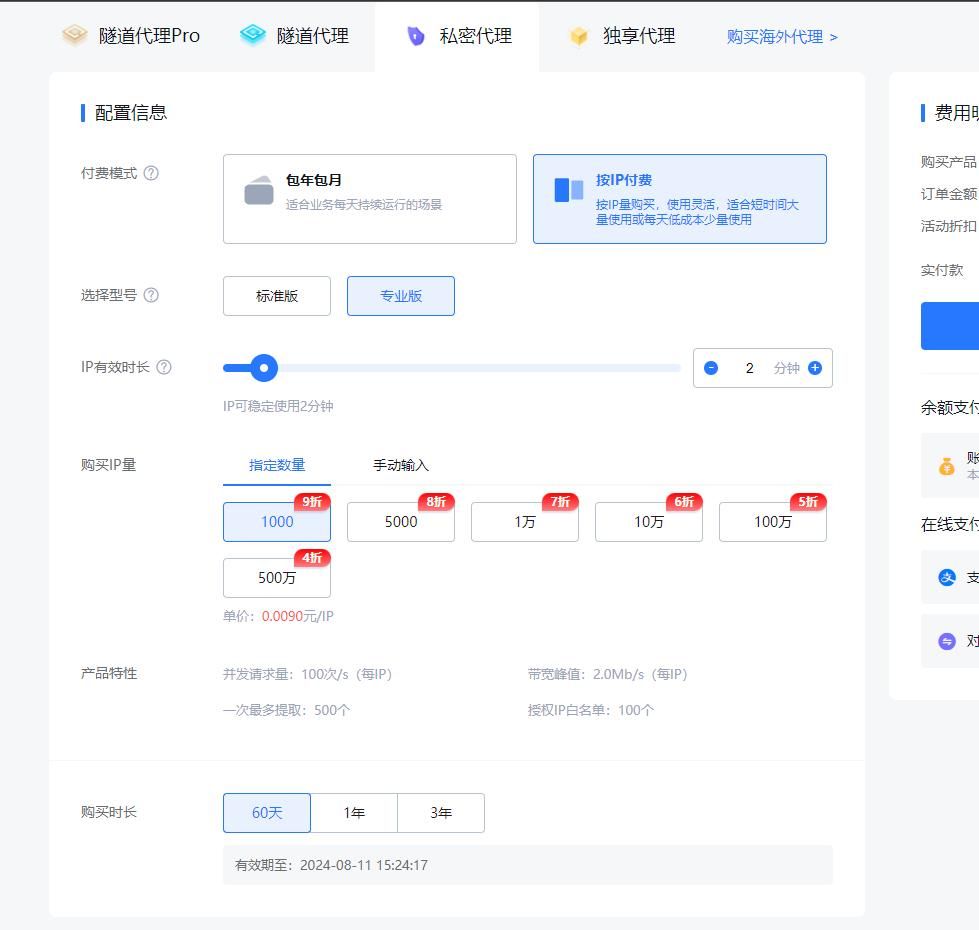
- After purchase, an order is generated and can be viewed on the "Private Proxy" page:
[REDACTED]
- We can then use the order key provided on the "API" settings page to access the "token endpoint" and obtain the corresponding token. This token is used to retrieve proxy IPs and is valid for 60 minutes by default, although the duration can be adjusted manually. After obtaining a proxy IP, the username and password supplied with the order are required to use it;
- For security, we also need to disable "plaintext key verification" by default in the "API" settings. Instead, obtain a time-limited token first and use it to retrieve proxy IPs as described above;
- IPs on the allowlist do not require username-and-password authentication. However, because there will eventually be many BAS server IPs, we will not use an allowlist and will instead use username-and-password authentication;
Obtaining Proxies
-
Step 1: Obtain a time-limited token (60 minutes by default)
- On the API page, select the corresponding order, view its SecretId and SecretKey, and enter them into the script below;
# 访问接口python3代码示例:
#!/usr/bin/env Python# -*- coding: utf-8 -*-import os
import sys
import json
import time
import requests

secret_id = ''
secret_key = ''
SECRET_PATH = './.secret'

def _get_secret_token():
    r = requests.post(url='https://auth.kdlapi.com/api/get_secret_token',data={'secret_id': secret_id, 'secret_key': secret_key})
if r.status_code != 200:
raise KdlException(r.status_code, r.content.decode('utf8'))
    res = json.loads(r.content.decode('utf8'))
    code, msg = res['code'], res['msg']
if code != 0:
raise KdlException(code, msg)
    secret_token = res['data']['secret_token']
    expire = str(res['data']['expire'])
    _time = '%.6f' % time.time()
return secret_token, expire, _time

def _read_secret_token():
with open(SECRET_PATH, 'r')as f:
        token_info = f.read()
    secret_token, expire, _time, last_secret_id = token_info.split('|')
if float(_time) + float(expire) - 3 * 60 < time.time() or secret_id != last_secret_id:# 还有3分钟过期或SecretId变化时更新
        secret_token, expire, _time = _get_secret_token()
with open(SECRET_PATH, 'w')as f:
            f.write(secret_token + '|' + expire + '|' + _time + '|' + secret_id)
return secret_token

def get_secret_token():
if os.path.exists(SECRET_PATH):
        secret_token = _read_secret_token()
else:
        secret_token, expire, _time = _get_secret_token()
with open(SECRET_PATH, 'w')as f:
            f.write(secret_token + '|' + expire + '|' + _time + '|' + secret_id)
return secret_token

class KdlException(Exception):
"""异常类"""

    def __init__(self,code=None,message=None):
self.code =codeif sys.version_info[0] < 3 and isinstance(message, unicode):
            message = message.encode("utf8")
self.message =messageself._hint_message = "[KdlException] code: {} message: {}".format(self.code,self.message)

    @property
    def hint_message(self):
returnself._hint_message

    @hint_message.setter
    def hint_message(self,value):
self._hint_message =value

    def __str__(self):
if sys.version_info[0] < 3 and isinstance(self.hint_message, unicode):
            self.hint_message = self.hint_message.encode("utf8")
returnself.hint_message

if __name__ == '__main__':
    secret_token = get_secret_token()
    print(secret_token)
- The token is shown below:
[REDACTED]
- The following code example sends the token (the signature value) to the proxy-IP API to obtain a proxy IP. After obtaining the proxy IP, its username and password must be supplied when using it;
#!/usr/bin/env Python
# -*- coding: utf-8 -*-

"""
使用requests请求代理服务器
请求http和https网页均适用
"""

import requests

# 提取代理API接口,获取1个代理IP
api_url = "https://dps.kdlapi.com/api/getdps/?secret_id=[REDACTED]&signature=$YOUR_SIGNATURE&num=1&pt=1&sep=1"

# 获取API接口返回的代理IP
proxy_ip = requests.get(api_url).text

# 用户名密码认证(私密代理/独享代理)
username = "[REDACTED]"
password = "[REDACTED]"
proxies = {
    "http": "http://%(user)s:%(pwd)s@%(proxy)s/" % {"user": username, "pwd": password, "proxy": proxy_ip},
    "https": "http://%(user)s:%(pwd)s@%(proxy)s/" % {"user": username, "pwd": password, "proxy": proxy_ip}
}

# 白名单方式(需提前设置白名单)
# proxies = {
#     "http": "http://%(proxy)s/" % {"proxy": proxy_ip},
#     "https": "http://%(proxy)s/" % {"proxy": proxy_ip}
# }

# 要访问的目标网页
target_url = "https://dev.kdlapi.com/testproxy"

# 使用代理IP发送请求
response = requests.get(target_url, proxies=proxies)

# 获取页面内容
if response.status_code == 200:
    print(response.text)
- The default response format is text. The format parameter can be used to request another response format, such as JSON;
The code is as follows:
#!/usr/bin/env Python# -*- coding: utf-8 -*-"""使用requests请求代理服务器请求http和https网页均适用"""import requests
import json

# 提取代理API接口,获取1个代理IP
api_url = "https://dps.kdlapi.com/api/getdps/?secret_id=[REDACTED]&signature=[REDACTED]&num=10&pt=1&sep=1&format=json"

# 获取API接口返回的代理IP
proxy_ip = requests.get(api_url)
proxy_dict = proxy_ip.json()
with open("./temp_proxy.json", "w+",encoding="utf-8")as f:
    json.dump(proxy_dict, f,ensure_ascii=False)
[REDACTED]
Important Notes
- Each order has a validity period. For the BAS product, purchase an order valid for at least one year because every order has a different authentication username and password;
Questions Recorded During the Meeting
-
Because the proxy IP pool is limited, the number of tasks that a single user can create must be restricted;
- The backend also needs to support resetting the task count;
-
Implement a single IP-blocking-time calculation as a Gatling plugin, with BAS handling scheduled execution;
-
Can BAS run IP-blocking tasks concurrently?