Environment Description
| IP | HOSTNAME | NOTE |
|---|
| 10.10.10.88 | win10_dqy | Test host |
Reproduction Process
The Following Script Can Add, Delete, Modify, and Query the Registry
function Operate-Registry {

<#
.DESCRIPTION
    Operate-Registry is a API for operate registry.

.PARAMETER Mode
    Three mode:Get, New, Update, Remove
    Mode Get: Get the value of specific property about registry.
    Mode New: Create a new property for specific registry.
    Mode Update: Update specific property's value for registry.
    Mode Remove: Remove specific property for registry.

.PARAMETER SubKey
    The registry key

.PARAMETER Name
    The property's name of registry key

.PARAMETER Value
    The property's value of registry key

.PARAMETER SpecSituation
    For Special Situation, Like procedure for add startup, following is the support instance.
    - "RunStartUp"

.EXAMPLE
    . "$pwd/generic_operate-registry.ps1";Operate-Registry -Mode "New" -SubKey "HKCU:\Software\ScriptingGuys\Scripts" -Name "Version" -Value "1"
    . "$pwd/generic_operate-registry.ps1";Operate-Registry -Mode "Update" -SubKey "HKCU:\Software\ScriptingGuys\Scripts" -Name "Version" -Value "2"
    . "$pwd/generic_operate-registry.ps1";Operate-Registry -Mode "Get" -SubKey "HKCU:\Software\ScriptingGuys\Scripts" -Name "Version"
    . "$pwd/generic_operate-registry.ps1";Operate-Registry -Mode "New" -SpecSituation "RunStartUp" -Name "SamVs" -Value "C:\Windows\System32\calc.exe"
    . "$pwd/generic_operate-registry.ps1";Operate-Registry -Mode "Update" -SpecSituation "RunStartUp" -Name "SamVs" -Value "C:\Windows\System32\calc.exe"
    . "$pwd/generic_operate-registry.ps1";Operate-Registry -Mode "Remove" -SpecSituation "RunStartUp" -Name "SamVs"

#>


    [CmdletBinding()]
    param (
        [Parameter(Mandatory = $False)]
        [string]
        $Mode,

        [Parameter(Mandatory = $False)]
        [string]
        $SubKey,

        [Parameter(Mandatory = $True)]
        [string]
        $Name,

        [Parameter(Mandatory = $False)]
        [string]
        $Value,

        [Parameter(Mandatory = $False)]
        [string]
        $SpecSituation
    )

    # add shortcut for specific program
    if ($Mode -eq "New") {

        if ($SpecSituation -eq "RunStartUp") {
            $SubKey = "HKCU:\Software\Microsoft\Windows\CurrentVersion\Run";
        }

        New-ItemProperty -Path $SubKey -Name $Name -Value $Value;

    } elseif ($mode -eq "Update") {

        if ($SpecSituation -eq "RunStartUp") {
            $SubKey = "HKCU:\Software\Microsoft\Windows\CurrentVersion\Run";
        }

        Set-ItemProperty -Path $SubKey -Name $Name -Value $Value;

    } elseif ($Mode -eq "Get") {

        $Result = (Get-ItemProperty -Path $SubKey).$Name | Out-String;
        Write-Output $Result;

    } elseif ($Mode -eq "Remove") {

        if ($SpecSituation -eq "RunStartUp") {
            $SubKey = "HKCU:\Software\Microsoft\Windows\CurrentVersion\Run";
        }

        Remove-ItemProperty -Path $SubKey -Name $Name

    } else {

        Write-Output "Please Input Correct Parameter";
    }
}
Modify the Registry Through the Script Above
- Run the following powershell script:
. "$pwd/generic_operate-registry.ps1";$origin_desktop_path = Operate-Registry -Mode "Get" -SubKey "HKCU:\Control Panel\Desktop" -Name "Wallpaper" | Out-String;

. "$pwd/generic_operate-registry.ps1";Operate-Registry -Mode "Update" -SubKey "HKCU:\Control Panel\Desktop" -Name "Wallpaper" -Value "$pwd/demo.jpg";

. "$pwd/generic_operate-registry.ps1";$modify_deskop_path = Operate-Registry -Mode "Get" -SubKey "HKCU:\Control Panel\Desktop" -Name "Wallpaper" | Out-String;

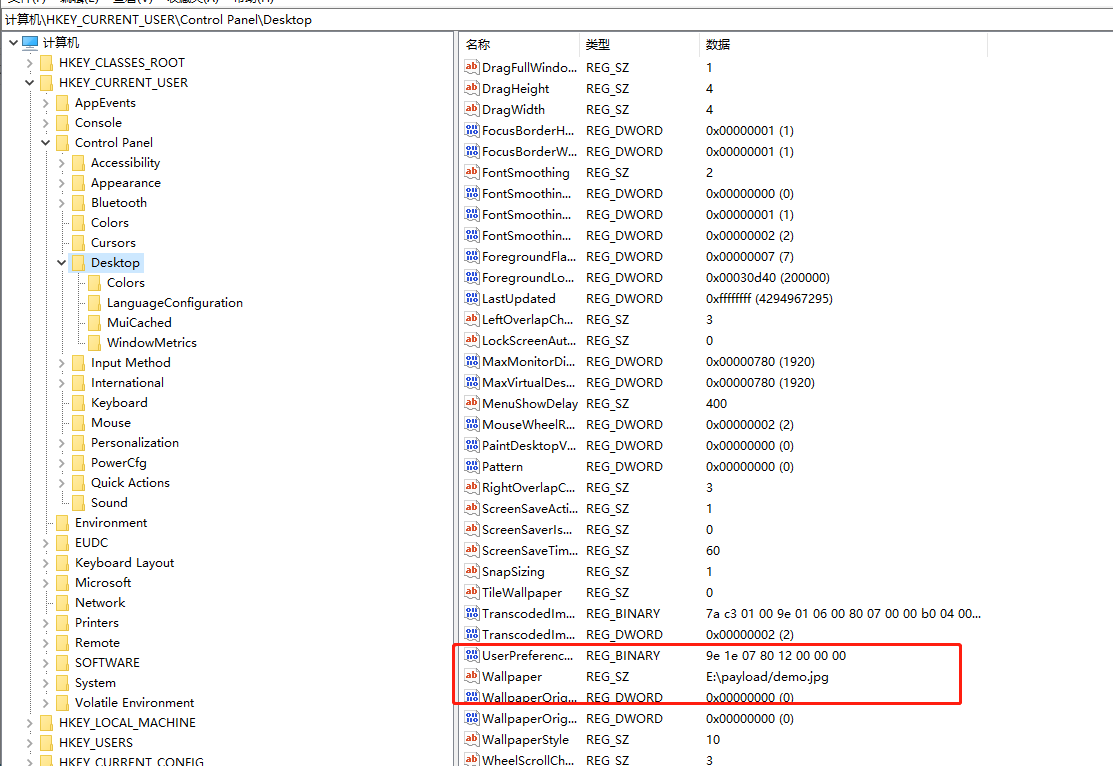
- Check whether it ran successfully: