Environment Description
| IP | HOSTNAME | NOTE |
|---|
| 10.10.10.91 | CentOS7 | N/A |
Environment Setup
Install kubectl
curl -LO "https://dl.k8s.io/release/$(curl -L -s https://dl.k8s.io/release/stable.txt)/bin/linux/amd64/kubectl"
chmod +x ./kubectl
mv kubectl /usr/bin/kubectl
Through a Specified yaml File, Create a pod
kubectl create -f busybox.yaml -n default # 在default namespace下创建pod
- The contents of the
busybox.yaml file are as follows:
apiVersion: v1
kind: Pod
metadata:
  name: busybox
spec:
  containers:
  - name: busybox
    image: busybox:stable
    imagePullPolicy: IfNotPresent
    command:
    - /bin/sh
    - -c
    - while true; do sleep 30; done;
- It is created successfully as shown below:

Execute a Command in the Specified container
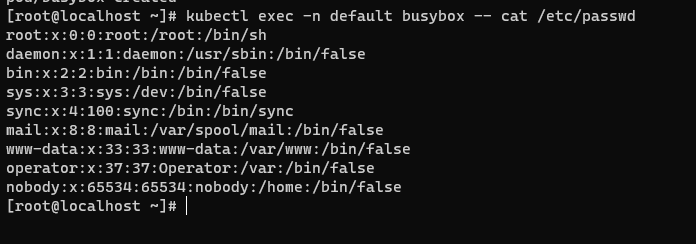
kubectl exec -n default busybox -- cat /etc/passwd
- The execution result is shown below: