Environment
| IP | HOSTNAME | NOTE |
|---|---|---|
| 10.10.10.88 | win10_dqy | Lab host |
Introduction
- Using NTFS alternate data streams (ADS) to hide malicious executable code is one technique for maintaining access. How to execute the hidden malicious code is also important. Next, we use the mklink command to create a link and then execute the malicious code hidden in a file.
- The following article introduces how to use NTFS alternate data streams (ADS). You can refer to it before reading this article:
https://contribute.knowledge.qihoo.net/post/5859
Reproduction Process
Hide an executable file with an ADS alternate data stream
- Create a new test.txt file, and then use the type command in a CMD window to add calc.exe to the file's ADS alternate data stream.
type calc.exe > test.txt:calc.exe
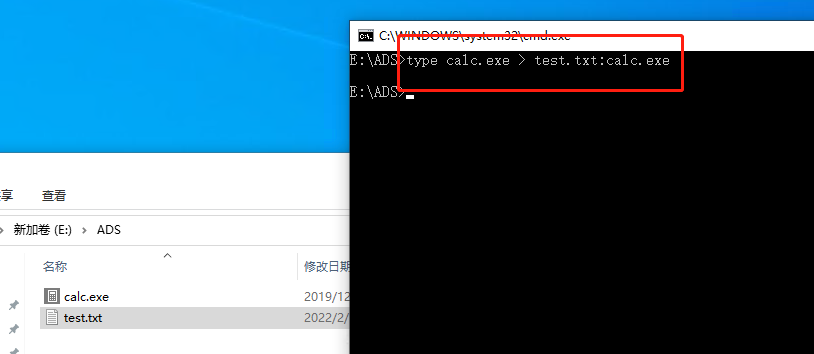
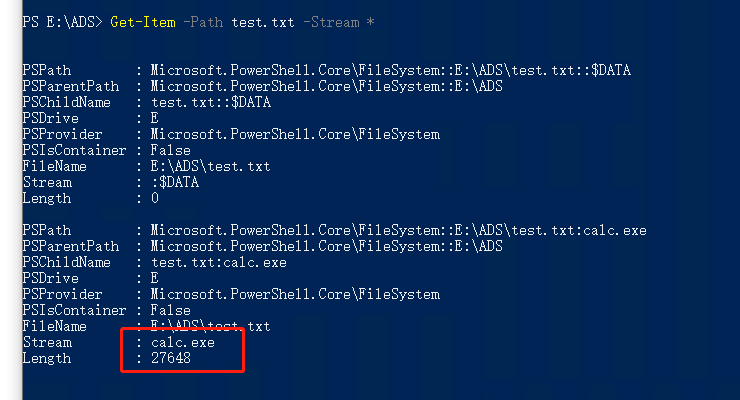
- We can then view the file's ADS alternate data streams with PowerShell's Get-Item command.
Get-Item -Path test.txt -Stream *
Attempt to execute the hidden executable file
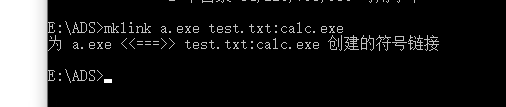
- We cannot directly use the start command to execute the executable code hidden in test.txt, but it can be executed after using mklink to create a link to the ADS alternate data stream.
Note: The mklink command requires administrator privileges and can only be executed in a CMD window.
mklink a.exe test.txt:calc.exe
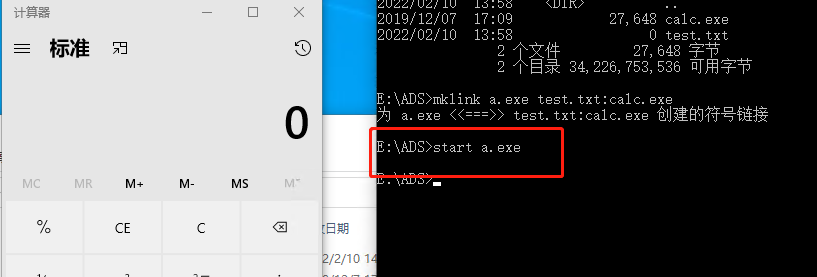
- Then use the start command to execute a.exe. As shown below, calc.exe executes successfully.